
You have seen them in your feed: a glowing rainbow ring, a funnel on top where the next ones wait their turn, little round characters dropping in one by one. Two identical ones touch, pop, they fuse into the next level. A score climbs under the ring, a row of ? slots lights up one by one, and everybody stays to the end to see what the ultimate level looks like.
This guide shows you how to make that exact format in a few minutes, three ways:
- Right on the page, with the Merge Evolution Video Generator: no account needed to try it.
- In the Autostud app, where the AI writes the chain, draws every level and reads every name out loud.
- From Claude (or any AI agent) through the Autostud MCP.
Want to try it right now? Open the Merge Evolution Video Generator, pick a theme and watch your video play in seconds.
Why the merge format works
The format is simple, and that is exactly why it performs:
- A built-in cliffhanger. The row of
?slots under the ring tells the viewer there are ten levels and they have only seen two. Nobody scrolls away at level 3. - Oddly satisfying physics. Balls roll, collide, pile up and pop. The
#oddlysatisfyingand#physicsgamecrowds watch these on loop. - A question in the title. "Who is the best one?", "Which snack wins?", "Rank the evolution". It turns a physics toy into a debate, and debates fill the comments.
- Infinite themes, one template. Potatoes, cats, planets, fast food, creatures you invent, your own mascot. Same video, new subject, new post.
- Short and loopable. A 10-level run lasts about 35 to 45 seconds, right in the sweet spot for TikTok, Reels and Shorts.
Anatomy of a merge video
Before building one, know the parts. Every piece is editable in Autostud.
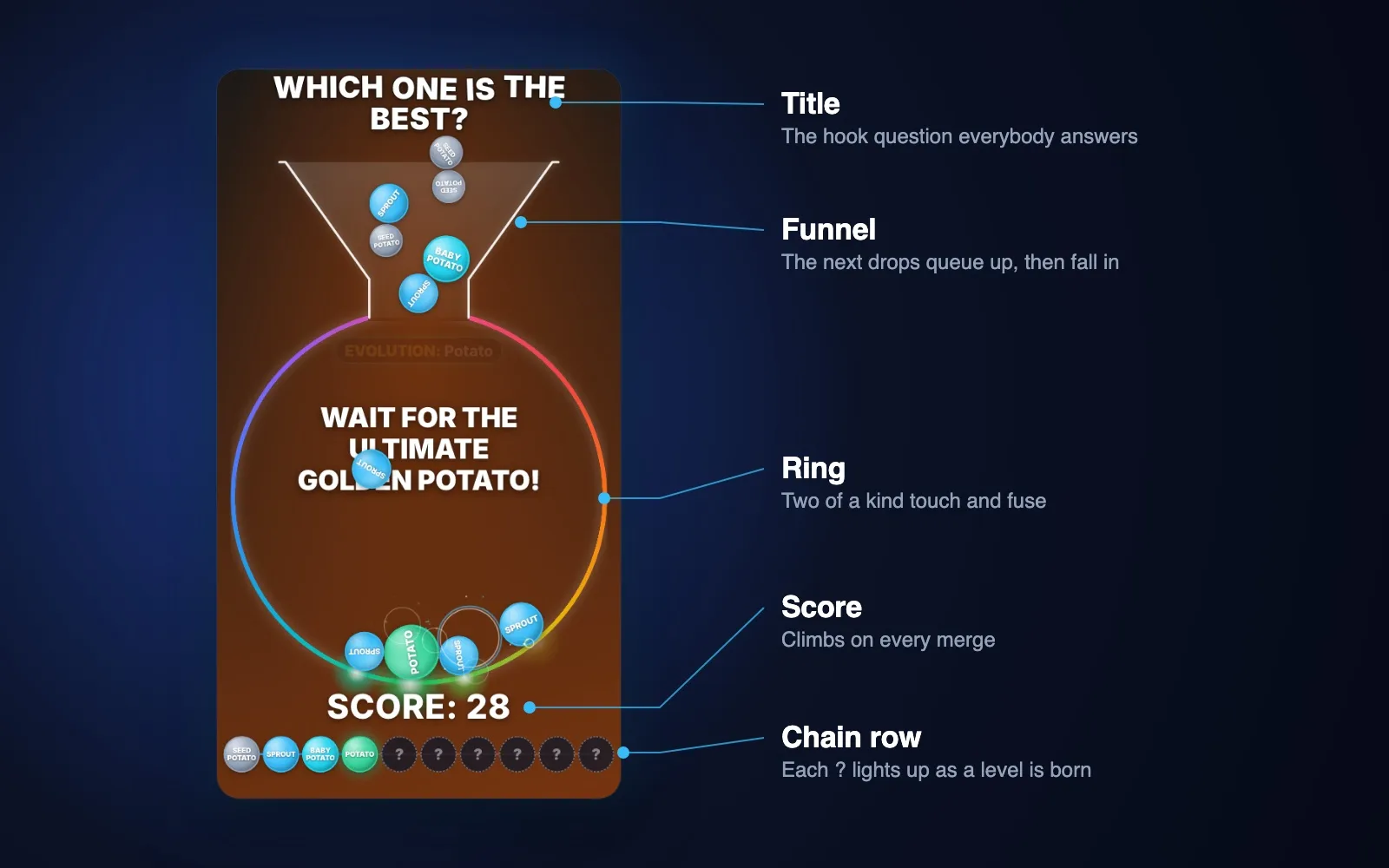
| Part | What it does |
|---|---|
| Title | The hook question at the top ("Which potato is the strongest?") |
| Funnel | The next items queue up in it, then drop into the ring one by one |
| Ring | The arena: a glowing rainbow ring (or a solid colour) |
| Levels | Your chain, smallest first: 4 to 12 levels, each one a "level" |
| Teaser | "Wait for the ultimate ..." written inside the ring until the top level appears |
| Score | Climbs on every merge, bigger merges are worth more |
| Chain row | The ? slots under the ring, lit one by one as each level is born |
| Voice | The name of each new level read out loud on its merge (full studio) |
| Sound | A pop that climbs in pitch with each level, a thump on landing, a fanfare at the end |
The physics are simulated, not animated by hand: every drop is aimed so that the run actually reaches the top level inside a short video, and the same settings always replay the exact same run, so what you preview is what you export.
Method 1: Make it on the page with the Merge Evolution Video Generator
The fastest way. No account to try it, nothing to install.
Step 1: Open the generator
Go to the Merge Evolution Video Generator. The preview starts playing right away on the Potato theme.
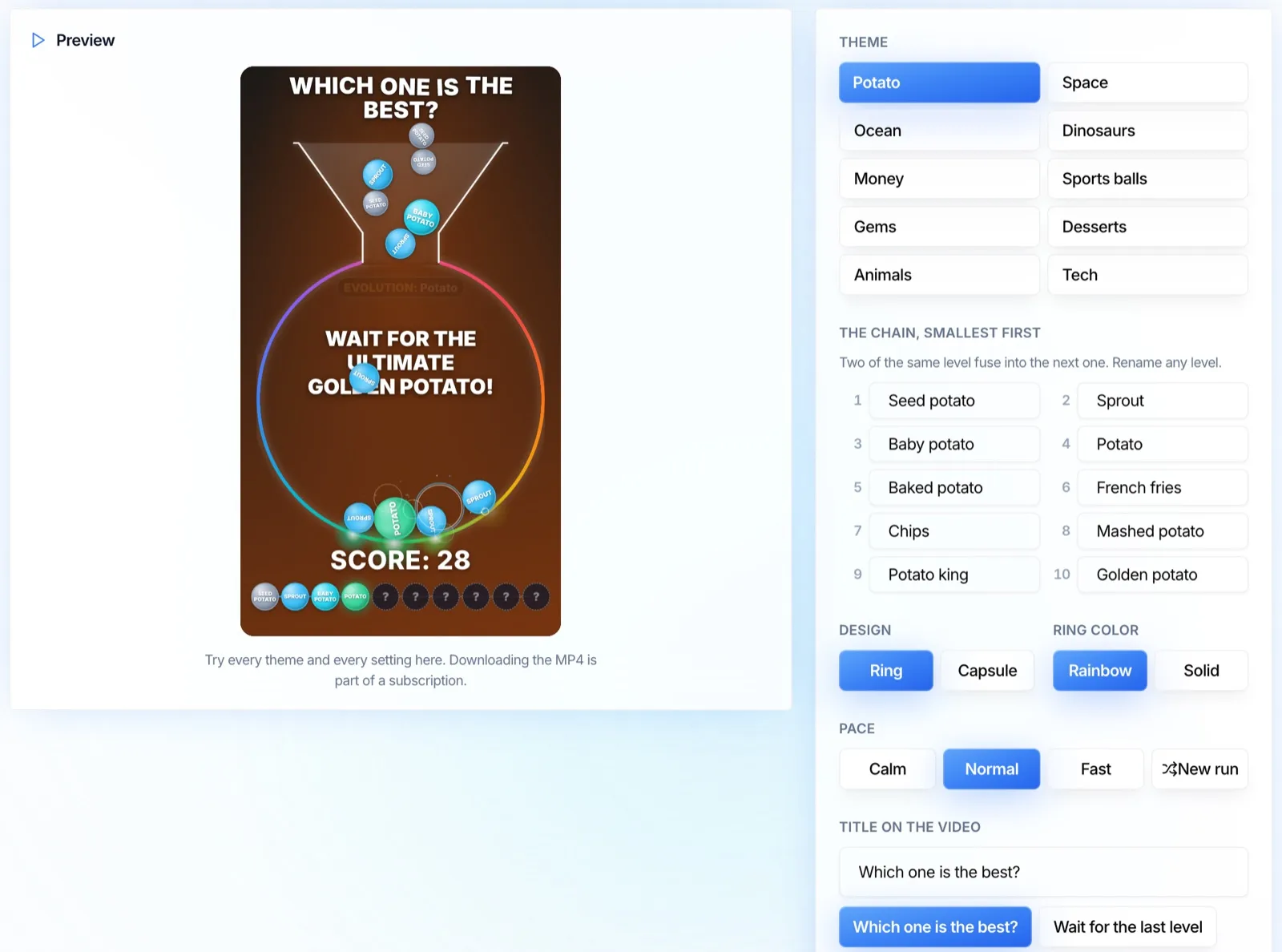
Step 2: Pick a theme
Ten ready-made chains of ten levels each, smallest first:
- Potato, Space, Ocean, Dinosaurs, Money
- Sports balls, Gems, Desserts, Animals, Tech
Step 3: Make it yours
- Rename any level. Type over the names to build your own chain: your favourite characters, your products, your inside jokes.
- Design: the Ring (the viral look, fed by a funnel) or the Capsule (a tall glass capsule).
- Ring color: Rainbow or Solid.
- Pace: Calm, Normal or Fast.
- New run: not happy with how the balls fell? One click for a brand new run with the same chain.
- Title: pick one of the ready-made questions or write your own hook.
Step 4: Export
Press Export the MP4. The video is rendered in your browser in 1080x1920, ready for TikTok, Reels and Shorts. Exporting is part of an Autostud subscription; trying every setting is not.
Method 2: Make it in the Autostud app (AI pictures + voices)
When you want any subject and a picture on every level, use the full studio. The generator page links to it with Open the full studio.
Step 1: Open the Merge evolution studio
- Go to Create a video.
- Pick the Merge evolution card.
- A short onboarding opens. It asks three things about your video.
Step 2: Give it a subject
Type what your chain is about. Be specific, it is what the AI writes the levels from:
- "Potato evolution, from a tiny fry to the king of potatoes"
- "Sea creatures, from plankton to a giant whale"
- "Fast food ranking, from a single fry to the ultimate burger"
- "My cat getting fatter, level by level"
Step 3: Let the AI write and draw the chain
Autostud writes the chain for you: a name and a short description for every level, smallest first. Then it:
- Draws a picture for every level in the same style, so the chain looks like one family.
- Records every name with a voice, so each level is announced the moment it is born.
When it is done, you land directly on your video, ready to preview.
Step 4: Tweak what you want
Everything is a control in the panel next to the preview:
- Levels: rename one, rewrite its description and redraw it, or pick a picture from your own files (your mascot, your product, your fan art).
- Design: Arena (the ring fed by a funnel) or Capsule.
- Ring: rainbow or a solid colour, plus the background gradient.
- Pace: calm, normal or fast. Normal reaches 10 levels in roughly 40 seconds.
- Shuffle the run: change the seed for a brand new run with the same levels.
- Texts: the title question, the teaser, the score word.
- Sound: pops, drops, finale and the voice volume, each on its own switch.
- Background music: pick a track from the library, paste a link, or use your own.
Step 5: Export
Hit Render, wait for the MP4, download it, post it. Want to go further? Switch to Advanced to open the same video in the timeline editor and add layers, subtitles or a hook clip before the run.
Method 3: Make it from Claude with the Autostud MCP
If you already work with Claude, ChatGPT or another agent, connect the Autostud MCP server and let it build the video for you. This is the fastest way to batch-produce a series (ten themes, ten videos, one conversation).
What the agent uses
| Tool | Role |
|---|---|
whoami | Checks your workspace and credit balance before anything is spent |
generate_image | Draws each level picture from a prompt (gpt-image-2 by default) |
describe | Reads the exact input of an action before calling it |
run_action videos.create | Creates the video with the merge layer and your levels |
run_action renders.create | Renders the MP4 on a worker |
list_records renders | Polls until the render is done, then returns the render_url |
Step 1: Ask for the chain
Paste something like this into your agent:
Using the Autostud MCP, make a merge evolution video.
Theme: potato evolution, 10 levels, from a tiny fry to the king of potatoes.
Title: "Which potato is the strongest?"
Design: arena with the rainbow ring, normal pace, portrait.
Draw every level as a cute round sticker character, same style for all,
centred on a plain background, 1:1.
Then render it and give me the MP4 link.
Step 2: The agent draws the levels
It calls generate_image once per level, keeping one shared style sentence in every prompt so the ten pictures look like one family. Tip: ask it to show you the ten pictures before it continues, and redraw any that look off. Redrawing a picture is much cheaper than re-rendering a video.
Step 3: The agent creates the video
It creates a timeline video whose composition carries one MergeScene layer. The layer's props are the whole video: the levels (name + picture, smallest first), the design, the ring, the pace, the seed and the texts. A trimmed example of what it sends:
{
  "component": "MergeScene",
  "props": {
    "format": "portrait",
    "shape": "arena",
    "ring": "rainbow",
    "pace": "normal",
    "seed": 42,
    "teaser": "Wait for the ultimate potato!",
    "levels": [
      { "label": "Tiny fry", "image": "https://..." },
      { "label": "Baby potato", "image": "https://..." },
      { "label": "King of potatoes", "image": "https://..." }
    ]
  }
}
You never have to write this yourself: the agent calls describe on videos.create first and builds the payload from the real contract.
Step 4: Render and download
The agent checks your credits with whoami, starts renders.create, polls the render until it is done and hands you the MP4 link. The video also lives in your Autostud library, so you can open it in the app afterwards and fine-tune anything from Method 2.
Batch a whole series
The real power of the MCP route: one message, a whole week of content.
Make 7 merge evolution videos, one per theme:
potatoes, sea creatures, fast food, cats, planets, dinosaurs, candy.
Same design for all, a different title question each time.
Render all of them and list the 7 MP4 links.
Tips to make yours perform
- Write the title as a question. "Which one is the best?" beats "Potato evolution" every time, because it asks for a comment.
- Make the top level worth waiting for. The last level is the payoff. Make it bigger, shinier, funnier. It is the frame people screenshot.
- Keep one visual style for the whole chain. Round, sticker-like characters on a plain background read best at small sizes inside the ring.
- 10 levels is the sweet spot. Fewer feels short, more than 12 makes the video drag.
- Leave the voice on (full studio). Hearing each new name announced is a big part of the retention.
- Post a series. Same design, a new theme every day. Viewers who liked one come back for the next.
- Use characters you have the right to use. Your own mascots, AI characters you generated, or your products. Avoid real people's faces and other brands' characters.
FAQ
How long is a merge video?
About 35 to 45 seconds for 10 levels at the normal pace. Calm makes it longer, fast makes it shorter, and fewer levels make it shorter too.
Can I try it without an account?
Yes. Every theme and every setting can be tried on the Merge Evolution Video Generator with no account. Exporting the MP4 is part of a subscription.
Can I use my own pictures instead of AI ones?
Yes, in the full studio. Every level has a "my files" button: pick any image you already uploaded, like your logo, your product or your mascot.
Will the export match the preview?
Yes. The run is computed from the seed, so the same settings always replay the same run, frame for frame. Change the seed (New run) only if you want a different run.
Does it work in other languages?
Yes. The generator page exists in 14 languages, the names and the title are yours to write in any language, and in the full studio the voice reads the names in the language you picked.
Do I need to know how to edit video?
No. Methods 1 and 2 never show you a timeline unless you ask for it. Method 3 does not even need you to open the app.
Summary
ON THE PAGE (Merge Evolution Video Generator)
1. Open the generator, the preview plays right away
2. Pick a theme or rename every level
3. Ring or capsule, color, pace, new run, title
4. Export the MP4 (subscription)

IN THE APP (full studio)
1. Create a video > Merge evolution
2. Type the subject
3. Autostud writes the chain, draws every level, records every name
4. Tweak design, ring, pace, texts, sound, music
5. Render > download > post

MCP (Claude or any agent)
1. whoami (credits)
2. generate_image x N levels, one shared style
3. videos.create with a MergeScene layer
4. renders.create > poll renders > MP4 link
5. Repeat per theme to batch a series
Pick a theme, make one today, and post the next one tomorrow. Start with the Merge Evolution Video Generator.